Check Availability
Full Fibre Plans
Unlock seamless communication with Sparta Business Phoneline.

Full Fibre Plans
Unlock seamless communication with Sparta Business Phoneline.
WHY CHOOSE US

Experience fast, reliable, and consistent connectivity. Our cutting-edge technology ensures superior performance for all your needs.



OUR SERVICES
Contact Us
Let our experts help you
FREQUENTLY ASKED QUESTIONS
Broadband speed: What is it and how does it work?
Fibre optic, copper, throughput speeds, ADSL and more. If you're confused by broadband
terms, we can help.
Broadband is something that millions of us use every day on our laptops, tablets and phones
to stay in touch, work and play. Broadband speeds vary depending on many factors, including
the technology and your location. Let's take a closer look.
What is headline speed?
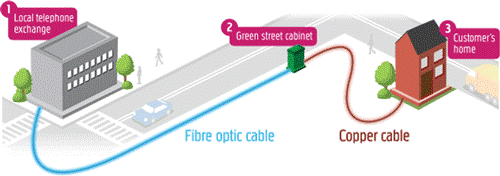
This is the speed you'll see advertised on internet products and in adverts. There are
various broadband technologies available, each capable of offering different headline
speeds. Some of the common ones are:
Improve your Broadband speed if slow
From checking your router position to keeping your PC secure, here you can get useful advice
on speeding up your broadband. By understanding what affects your broadband and making some
simple changes, you can enjoy faster broadband speeds.
If your broadband was fine, and you've just seen a big drop in your speed, it might be down
to a network issue in your area. (call us to check if there is a problem on your line)
These are the most important things that affect your broadband speed:
If you're having problems viewing web pages or difficulties connecting to your Router, then
you've come to the right place.
Five things to try after first
Many of our customers with broadband connection problems find that the following steps after
help.
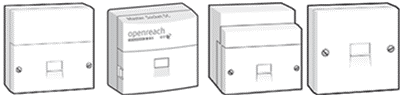
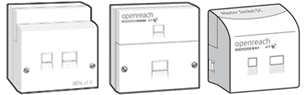
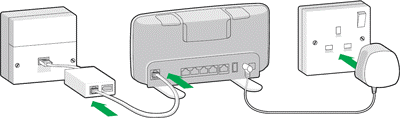 Check that the Router is switched on and the lights are steady blue
Minimum Guaranteed Access Line Speed
The broadband line speed you can get will vary depending on a number of factors such as how
far away your home is from the local telephone exchange and the length of your line.
When we look at all the customers who have a similar type of line (for example, customers
who are 3km from the exchange) and the same level of service (for example, all with 'up to
8Mbps broadband'), the 'Minimum Guaranteed Access Line Speed' is the fastest speed that any
customer in the bottom 10 per cent of that group of customers can get.
So, if there are 20,000 customers who fall into the group covered by this example, we would
look at the 2,000 customers with the slowest speeds. The Minimum Guaranteed Access Line
Speed would be the fastest speed that any of those 2,000 customers actually achieve.
If your line speed is significantly lower than the estimated range that we quoted when you
placed your order you should contact us on 0800 915 9396. We will always try to improve your
line speed. If the cause of the problem is outside our control, we will endeavour to explain
the possible causes to you and how you may be able to address the problem.
If the fault is within our control and we are unable to resolve, you may be entitled to
cancel your broadband contract without paying a charge for ending it early.
Cancellation of your service will be subject to the following conditions:
Here are some simple manual steps to get your Sparta broadband connection up and running
again.
Perform a 'power cycle'
Many connection problems are solved by 'power cycling' - which is simply shutting down and
turning off your Sparta modem, and computer in a controlled manner, then turning everything
back on again.
Try restarting your Sparta modem first, then your Hub.
Check your phone line is working
Problems with your phone line can affect your broadband so it's useful to check it's
working.
Have you checked your leads?
If there are no lights lit up on either your Sparta modem or Hub, check that their power
cables aren't loose, and double check that they're plugged in properly and switched on at
the mains. You should also check that the cable from the Sparta modem to your Hub is
securely connected at both ends. If you're using an Ethernet cable to connect your Hub to
your computer, make sure that's also securely plugged in at both ends. When you push the
connector in, you should hear a click as it locks into place.
Is your computer compatible?
If you didn't check your computer was compatible before ordering Sparta Broadband or you've
just changed to a new computer, your problem may lie here. Please check the computer
requirements page and upgrade any components that do not meet the minimum standard.
Do you have security software installed and enabled?
If you don't then it could be that your connection is running slowly because of a virus or
trojan or spyware. If you haven't done so already, then we recommend installing one of the
Sparta security software to deal with these specific problems and generally keep you safe
online.
Can't connect wirelessly?
Electrical items such as microwaves and halogen lighting can interfere with wireless
connections. You'll also have an unreliable wireless connection if your computer is only
just in range of your Hub or router.
Your computer might not be able to find the wireless signal from the Hub. Or you might be
able to see the signal, but your computer can't connect to it. No link given below to get
more help setting up or fixing a wireless connection.
First check your phone as your broadband comes down the same wire. Listen for anything
unusual with the sound from the phone, try dialing or call your number from another phone
just to make sure you don’t have a faulty line.
There can be a number of reasons your broadband may drop. If you are running a lot of
programs at the same time, they could be taking up resources which means there is not enough
resource to transmit on the broadband. If you are running a lot of programs at the same
time, try closing a few to release resources.
Internet Security software blocking websites
If you were able to load websites until you updated your browser or windows update or until
your Internet security software was updated, reconfigured or a new one was added, your
Internet security software (including firewalls, antivirus programs, anti-spyware programs,
and more) is likely preventing your browser from connecting to the Internet.
You can also get this if website is no longer at the URL you typed in or if the website is
slow you may see error code timed out.
In general, you should make sure your Internet security software is up-to-date and remove
your browser from your program's list of trusted or recognized programs, then add it back.
If you still have problems give us a call on 0800 915 9396
Firstly make a note if the fault is seen to be inside or outside the property, i.e. hanging
or broken wires.
What the fault is i.e. noise on line, calls dropping, what you are experiencing, the more
detail the better.
You can call us on 0800 915
9396
Our team can check the line for you to see if a problem is shown (you may have to disconnect
the call for this test to be done) The team will call you back with the result.
If they can fix the fault they will, if not it may mean arranging an Openreach engineer to
call to trace and fix the fault.
You will be asked to accept the engineer charge as below. If you do not accept the charge
(Please note if the fault is found to be your own equipment such as, wires or your socket
you will be asked to pay for the visit currently £105 + Vat. If the fault is found to be
outside of your property anywhere from the exchange to the point where the line enters your
property, this is classed as a network fault and is not chargeable)
What Sparta Telecom service do you have a problem with?
Remember to tell us if the fault is with your landline phone or broadband or both
Give us a call on 0800 915 9396
to check the progress of your fault report or if the fault is still
occurring call us and let us know.
Sometimes a fault may be intermittent which are difficult to detect, always let us know if
this is the case. Where we have arranged an Openreach engineer, it may be that work is
required in the road or the exchange, which may take a bit longer, you can call us to get an
update.
Join Our Newsletter
Join Our Newsletter
Sparta Telecom Ltd ©2024 Sparta Telecom Limited All Rights Reserved. Powered By Fast Ranking